
.svg)
FaceAssure On-Browser | Getting Started
Latest available version in Production: v1.10.26 & v1.10.27
Endpoints:
Production: https://d3ogqhtsivkon3.cloudfront.net/
- 1 Prod Version changelogs
- 2 Recommended Sizes for the iFrame
- 3 Modes of Execution
- 4 Demo mode
- 5 Integration mode - Using JWT
- 5.1 Standard Claims
- 5.2 Showing preparation instructions: shi Claim
- 5.3 Execution Behavior: age claim
- 5.4 Return Format: rtf Claim
- 5.5 Return Behavior: rtb and rdr Claims
- 5.6 Verification identifier: vid claim
- 5.7 Version selection identifier: ver claim
- 5.8 Theme support: thm claim
- 5.9 Timeout limit: tmt claim
- 5.10 Sample JWT Request Generation
- 6 The Response Payload
- 7 Querying Transaction Results Outside the Execution Time
- 8 Recommended Age Gates
- 9 User Experience with QR Codes
- 10 Current Behavior and Error codes
- 11 Additional Considerations
Ideal width:
850pxIdeal height:
600pxIf you want to preserve a
16:9aspect ratio:Minimum required height:
550px
If you want to preserve a 4:3 aspect ratio
Minimum required height:
600px
Add
The end-user will see "Age Check Complete. TX id....". Whether the age check succeeds or not depends on the claims in the request payload.
The user will be redirected based on the parameters specified in the JWT token
Liveness features are always enabled.
Add the following to activate this mode:
Add
stillMode=trueto skip active liveness checks. Passive liveness checks are always on by default.Add
shi=trueto display instructions screen to the user.Ideal for external demonstrations
Target browsers: Chrome (mobile and desktop alike)
This is a documentation for the browser-based experience of Privately’s facial age estimation technology. The UI elements are fully managed by Privately, enabling you to only focus on the communication between your system and Privately’s.
Prod Version changelogs
Please refer to Changelog: AgeAssure On-browser fully-managed
Recommended Sizes for the iFrame
Desktop:
or
or
Mobile:
Minimum width: 375px
Height: 100%
Modes of Execution
Integration mode - uses signed JWT tokens |
|
Demo mode |
|
Demo mode
This mode is pretty much plug-and-play. You may supply your session_id and session_password as query string parameters, and test out the system. This option has limited configurability (such as age limits), therefore it might not be suitable for production at large scale.
Cross-Origin Communication with session id/password pairs
It’s possible to set up an iFrame/WebView, embed this page, and ingest the execution output with cross-origin communication via postDocument(), with a structure as follows:
{
    age_identified: "25+",
    gate_identified: 25, // the highest possible age gate from presets (16, 21, 25)
    minAge: 33.5,
    maxAge: 37.2,
    transaction_id: "..." // a unique transaction ID for your records
    status: "AGE_CHECK_COMPLETE", // or the error code if the estimation wasn't done
    score: 1, // the confidence of the interval [minAge, maxAge]
    exp: 1640995200,
    nbf: 1609459200,
    iat: 1609455600
}
In order to receive this message, you should add an event listener to your parent page:
window.addEventListener('message', function(e) {
    // Get the sent data
    const data = e.data;
    console.log(data);
    /* Surround the event message processing against
    unexpected messages from sources other than the on-browser page: */
    try
    {
        var t = JSON.parse(data);
        var age_identified = t["age_identified"],
            gate_identified = t["gate_identified"],
            min_age = t["minAge"],
            max_age = t["maxAge"],
            execution_status = t["status"];
        //alert(t)
        //alert("age_identified = ", age_identified)
        /* Your execution logic goes here */
    }
    catch(err)
    {
        //alert("not processing: ", data) // OR the one below
        alert("I skip a message, because: ", err)
    }
});
We nevertheless recommend instead a JWT-based communication when you deploy with the “Integration mode” - see below.
Integration mode - Using JWT
In integration mode, we assume that you pass a JWT request token as a base-64 query string parameter called token. The payload of this token, once parsed, should resemble to the following structure:
{
  "iss": "https://your.url.where.we.find/your/public/key",
  "sub": "9e39aa249a259c1779a5209f4fe1b57b"
  "aud": "https://api.privately.swiss"
  "exp": 1640995200,
  "nbf": 1609459200,
  "iat": 1609455600,
  "jti": "<your-custom-transaction-id>",
  "vid": "<your-custom-verification-id>",
  "ver": "v1.10.26" // (or higher)
  "rdr": "https://your.custom.url/your-custom-route",
  "age": 21,
  "cfd": 0.9,
  "rtf": "interval",
  "rtb": "callback",
  "shi": true
}
Standard Claims
iss, sub, aud, exp, nbf, iat and jti are part of the standard JWT claims.
issis the URL where we can query your public key you used to sign your claims.subshould contain a value generated from your side. It will be helpful in our shared analytics. While Privately can be completely abstracted from the logic with which this value is generated, it will be helpful for you to distinguish transactions for unique clients, deployment environments, etc.jtishould indicate a unique transaction ID. Its value should be generated from your side, so that you can avoid replay attacks or fake transaction payloads.exp(expires-at),nbf(not-before) andiat(issued-at) dates indicate the validity of the request payload. Our system will reject requests if the processing time does not comply the constraints of these dates.
Showing preparation instructions: shi Claim
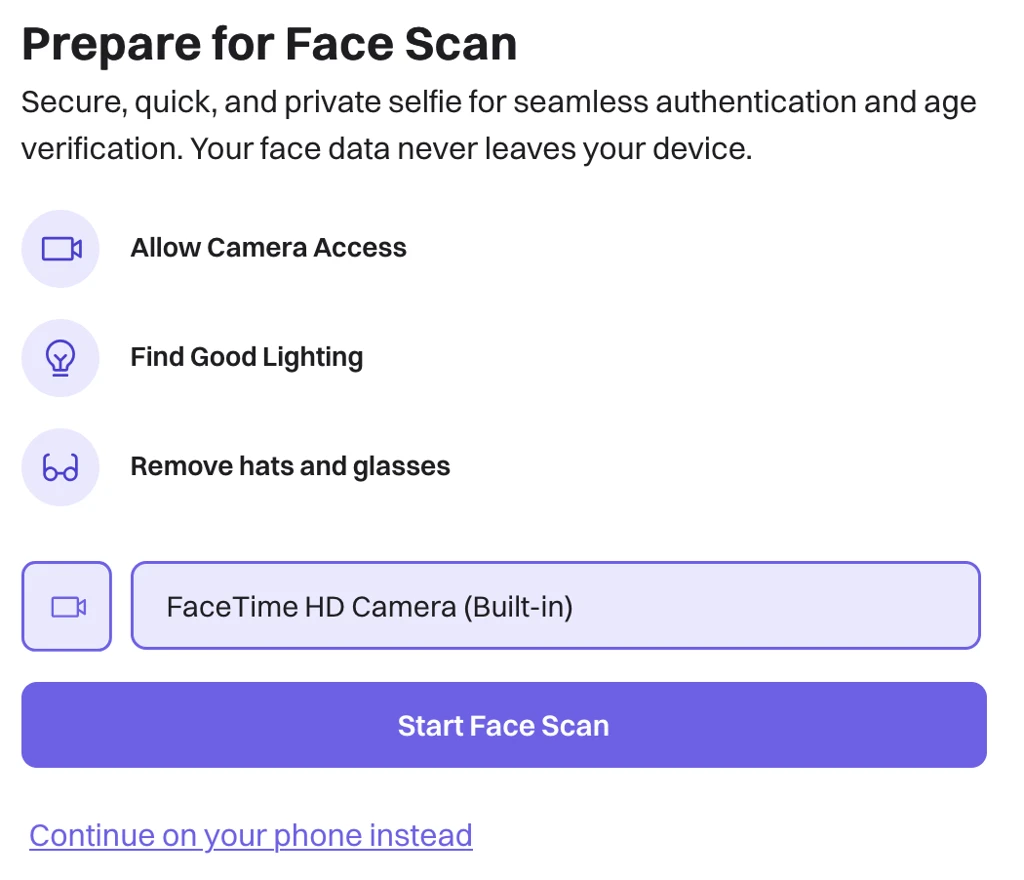
shi (default value: false), shall define whether we show the initial instructions screen to the user (see below). When shi is set to true, This screen allows the user to prepare themselves, select a camera for the test, or scan a QR code to continue the process on a mobile device.
Execution Behavior: age claim
ageshall contain the target age in years that Privately should use for estimation. If we observe the test subject’s age to be higher than the confidence level identified in thecfdclaim, then we will return a positive response. See “Recommended Age Gates”
Our system delivers liveness checks by default. Be advised that we do not allow configuration of our liveness features. Without these, we do not guarantee the same level of assurance of our age checks. We reserve the right to override this setting based on the customer's use-case. Please contact us if you’d like to have such a bespoke configuration
Return Format: rtf Claim
rtf shall define the return format in the rlt claim in our response token once the age check is complete. Options shall be:
“query” [DEFAULT OPTION]: Given your
age,cfd, andlivrequirements, the system will returntrueorfalsein therltresponse field.“interval”:
rltresponse field shall include sub-fieldsminAge,maxAge,scoreandgate. These will let you run your future queries on the output credentials without having the user redo their age checks until the expiry of the response. For adulthood detection, gate will be an integer that gives the highest gate that we can guarantee from our list of preset gates (16, 21, 25). If there are any issues in the execution, we will return these values as 0 (see “Current Behaviors and Error Codes” section).
Return Behavior: rtb and rdr Claims
rtb shall define the return behavior once the age check is complete. Options shall be:
“redirect” [DEFAULT OPTION]: The user shall be redirected to the URL you’ve defined in
rdr, with our response JWT payload as a query string parametertoken: https://your.custom.url/your-custom-route?token=<ourJWTtoken>“message”: The token will be sent via postDocument() to the parent page that embeds our page. The browser page will not navigate anywhere.
Just like the demo mode, you can still listen to cross-document message events. However, this time the payload will be structured as follows:
{ token: "{encodedHeaders}.{encodedPlayload}.{encodedSignature}" }“callback”: Repeats the behavior in “message” mode, and also make the full results sent from our servers to the webhook you register in
rdr. In other words, we’ll send HTTP POST to: https://your.custom.url/your-custom-route?token=<ourJWTtoken> The browser page shall not navigate anywhere.
If you use the “callback” option,
We recommend that you to keep a track of valid JWT IDs that you’ve sent within the
jticlaim. This way you can avoid fake responses with unknown JWT IDs.Please further indicate if you’d like to use additional authentication mechanisms for the webhook you’ll register.
If you want to register a single webhook for multiple assets (subclients, deployments, endpoints, experiments,…) etc., we recommend you to distinguish these assets via separate values in the
subclaim. This will help yourself and us better keep track of the analytics associated with these separate assets.
Verification identifier: vid claim
Your business logic may require you to give a fixed number of retries to an end-user. In such cases, you can use the optional vid claim to keep track of the number of attempts.
Version selection identifier: ver claim
The JWT authentication token may now have the mandatory claim "
ver", to indicate which version you'd like to use.This is particularly interesting if you would like to incrementally rollout and/or perform A/B tests on the features
Theme support: thm claim
The JWT authentication token may now have the optional claim "
thm", to indicate font and coloring options.
As exemplified below, you can specify font families, font colors, border and background colors within this claim
"thm": {
      "headerFontFamily": "https://fonts.googleapis.com/css2?family=Paytone+One&display=swap",
      "descFontFamily": "https://fonts.googleapis.com/css2?family=Poppins:wght@400;600&display=swap",
      "infoFontFamily": "https://fonts.googleapis.com/css2?family=Poppins:wght@600&display=swap",
      "cameraSelectorFontFamily": "https://fonts.googleapis.com/css2?family=Paytone+One&display=swap",
      "buttonFontFamily": "https://fonts.googleapis.com/css2?family=Baloo+2:wght@700&display=swap",
      "headerFontColor": "#0EA5A4",
      "descFontColor": "#334155",
      "infoFontColor": "#0F172A",
      "cameraSelectorFontColor": "#10B981",
      "cameraSelectorBgColor": "#E6F7D9",
      "cameraSelectorBorderColor": "#10B981",
      "iconBgColor": "#E6F7D9",
      "iconBorderColor": "#10B981",
      "startButtonBgColor": "#10B981",
      "startButtonTextColor": "#053B2D"
    }
Timeout limit: tmt claim
Determines how many seconds do you allow the users to complete the transaction. Default is 60 seconds.
Sample JWT Request Generation
In order to generate a “compliant” but unsigned JWT request payload, you use a snippet similar to the one below. In order to run the snippet below, you can paste it into a file called jwtGeneration.js and then run node jwtGeneration.js :
const crypto = require("crypto");
function getRandomHexID() {
    return crypto.randomBytes(32).toString("hex")
  }
function generateClaimsForJWT(args)
{
  let timestampGenuine = Date.now() / 1000; // the number of milliseconds since January 1, 1970 00:00:00.
  timestampGenuine = ~~timestampGenuine;
  let claims = {
    iss: "client-issuer-url", // the URL where we'll check the public keys
    sub: "9e39aa249a259c1779a5209f4fe1b57b",
    aud: "https://api.privately.swiss", // the URL where we'd supply the publich keys
    exp: timestampGenuine + 100, // Expiration time -- assuming genuinely 100 seconds after issued-at
    nbf: timestampGenuine, // not-before, which is right now
    iat: timestampGenuine - 2, // issued-at -- assuming 2 seconds before
    jti: getRandomHexID().replaceAll('-', ''),
    rdr: "https://privately.eu", // redirection URL
    age: 18,
    cfd: 0.9
  }
  return claims;
}
function buildJwt(claims) {
    const header = {
      alg: "HS256",
      typ: "JWT",
    };
    const HMACSHA256 = (stringToSign, secret) => "not_implemented";
    const encodedHeaders = encodeURIComponent(btoa(JSON.stringify(header)));
    const encodedPlayload = encodeURIComponent(btoa(JSON.stringify(claims)));
    const signature = HMACSHA256(`${encodedHeaders}.${encodedPlayload}`, "mysecret");
    const encodedSignature = encodeURIComponent(btoa(signature));
    const myjwt = `${encodedHeaders}.${encodedPlayload}.${encodedSignature}`;
    //console.log(myjwt);
    return myjwt;
  }
function demo(args)
{
    let claims = generateClaimsForJWT(args);
    let myJWT = buildJwt(claims);
    console.log(myJWT);
}
const args = process.argv.slice(2);
demo(args);
We will require you to:
Sign your payloads
Point to the public key that we can use to verify your JWT request
Give the name of the algorithm 'RS256', 'ES256', etc. that you've used for encryption.
We strongly recommend you to use off-the-shelf packages such as https://www.npmjs.com/package/jsonwebtoken to sign and verify JWT tokens in production.
The Response Payload
The response payload’s claims shall have the following structure:
{
  "iss": "https://api.privately.swiss",
  "sub": "9e39aa249a259c1779a5209f4fe1b57b"
  "aud": "https://your.url.where.we.find/your/public/key",
  "exp": 1640995200,
  "nbf": 1609459200,
  "iat": 1609455600,
  "age": <mirrors the age claim from the request payload>,
  "liv": <whether liveness check was enabled or not for this TX>,
  "jti": "<your-custom-transaction-id>",
  "rlt": true | {"minAge":..., "maxAge": ...},
  "rsn": "AGE_CHECK_COMPLETE",
  "ufi": []
}
Our custom field
rltcontains information based on the return format claim of the original request.If the requesting JWT’s
rtfis set to “query”,rltshall be a boolean on whether the end-user satisfies the constraints laid out in the request payload’sage,cfd,livclaims.If the requesting JWT’s
rtfis set to “interval”,rltshall be of format{"minAge":..., "maxAge": ...}, where[minAge, maxAge]is the 95% confidence interval.
We added another custom field
rsn, which might give more information if we deem necessary, such ascomplete_transaction,user_did_not_follow_instructions, etc.Yet another claim,
ufi, shall indicate a list of instructions that the user hasn’t completed before the end of the age check. Possible values that can be inserted to this list are:NO_FACE,STAY_STILL,LOOK_STRAIGHT,CENTRE_FACE,TURN_LEFT,TURN_RIGHT,ALIGN_YOUR_FACE_WITH_THE_CAMERA_UP,ALIGN_YOUR_FACE_WITH_THE_CAMERA_DOWN,SLIGHTLY_TILT_YOUR_HEAD_LEFT,SLIGHTLY_TILT_YOUR_HEAD_RIGHT,OPEN_YOUR_MOUTH,KEEP_YOUR_MOUTH_OPEN,CLOSE_YOUR_MOUTH,SLOWLY_COME_CLOSER_TO_THE_CAMERA,SLOWLY_DISTANCE_YOURSELF_FROM_THE_CAMERA,TOO_DARK
Given a response payload claims, here’s a snippet that verbosely demonstrates what we do to sign our response JWT:
buildJwt(claims){
    const header = {
    "alg": "RS256",
    "typ": "JWT"
    }
    const RSA256 = (stringToSign, secret) => "library_implementation"
    const encodedHeaders = encodeURIComponent(btoa(JSON.stringify(header)))
    const encodedPlayload = encodeURIComponent(btoa(JSON.stringify(claims)))
    const signature = RSA256(`${encodedHeaders}.${encodedPlayload}`, "mysecret")
    const encodedSignature = encodeURIComponent(btoa(signature))
    const myjwt = `${encodedHeaders}.${encodedPlayload}.${encodedSignature}`;
    return myjwt
}
The output, myjwt , would be added as a query string parameter (token) to the redirection URL obtained from the request payload.
Querying Transaction Results Outside the Execution Time
You may encounter cases where you will need to query the transaction results outside the execution time, due to network availability and/or in order to reuse an existing age check result. In this case, you may send an HTTP POST request to the following endpoint:
JWT result query endpoint: https://wycmdhq5c2.execute-api.eu-west-1.amazonaws.com/default/d-privately-age-services
Sample payload (raw/JSON):
{
    "request_type": "query_jwt_result",
    "api_key": "<your_api_key>",
    "transaction_id": "<value_set_in_jti_claim>"
}
Success case: If such a transaction has already happened, The output of this request will be a base64 string of our signed JWT payload, which follows the same format described above in “The Response Payload”.
When we issue our JWT response token, we set its exp (“expiration”) claim 10 minutes from its issuance date. Therefore, depending on the time in which you query the results, you may receive a token that has already expired and therefore cannot be validated. However, the raw payload will still be included for your inspections at any time.
Fail case: If such a transaction doesn’t exist with your api key, you will receive a response with the HTTP status 400:
{
    "request_not_complete": "<the_invalid_transaction_id>"
}
Recommended Age Gates
In the context of data privacy laws such as GDPR, Privately is a “Data Processor” - i.e., our software provides our age estimation assessments, but we cannot take decisions on your behalf. As a relying party, it is incumbent on you to implement our solution to the level of effectiveness that you are required to put in place by laws set in the jurisdictions that you operate.
Below are the age buffers that we recommend you to set in order to ensure that you’ve implemented a highly effective solution
Age display to the end-user |
|
Target age gates | The system will accept target age gate inputs as, or will convert them to, 16, 21 and 25. |
These age gates are determined by the inputs we have gathered from regulators, the market, our internal benchmarking, and our public EAL3 certifications:
Bearing in mind the EU regulations for parental consent, 16 is a good buffer age to determine whether a given user can ask for verified parental consent.
25 comes from the Challenge-25, where businesses are obliged to check for an ID for stronger age verification if the user appears to be below the age of 25.
23 is the buffer age for ensuring highly effective performance for the 18 age gate
21 is the buffer age for ensuring highly effective performance for the 16 age gate
User Experience with QR Codes
When a user opts to scan a QR code and continue their tests on another device, the following effects unfold:
It is understood that the user has already read the instructions from their first device, thus QR codes lead to URLs that have &shi=false in the query string parameters.
Upon the successful completion of the test in the second device, the user will not be able to submit an age check from the first device.
If you have chosen to embed our page as an iFrame to your page, you should make sure that you’ve set
rtb:callback, and terminate our iFrame as soon as you receive the results from your webhook.
The QR code is intended to be used just once, therefore it is deleted:
As soon as it is scanned
As soon as an age check is completed (exceptions: if user denies camera, or their devices are deemed incompatible to start the execution).
If more than a minute has passed since its issuance.
Current Behavior and Error codes
Incident | Behavior |
User completes the transaction | User is redirected to the url defined in |
A previously consumed JWT token is presented |
|
JWT token includes |
|
No token is presented, or the JWT token does not parse with the parseJwt function |
|
User does not follow the instructions, and thus a timeout occurs |
|
User closes the window without finishing the check |
|
User denies camera access to our interface |
|
A presentation attack is detected (printed photo / face masks are physically presented to the camera) |
|
A screen attack is detected (image/video shown from another device) |
|
An injection attack is detected (a pre-recorded media fed directly through virtual devices) |
|
Redirection URL is not valid |
|
Additional Considerations
Before large scale deployments please consult us for optimized scaling solutions.
For customised frontend, contact us for a specific version of our "white-label" product option, e.g. integrating your visual assets
When possible, Privately stores the transaction outcomes also in its databases. Upon request, we can open an endpoint to you so that they can query these records. Additional logs can be made available based on mutually agreed design choices.
OWASCSAM-iOS-GettingStarted
Explore Privately's OWAS CSAM SDKs and proactively tackle harmful content for a more inclusive online space.
OWASCSAM-iOS-Samples
Discover a safer iOS playground: Explore Privately's OWAS CSAM SDK samples and witness responsible content moderation in action. Learn, build, and protect.
.svg)